
Residential Digital Meters
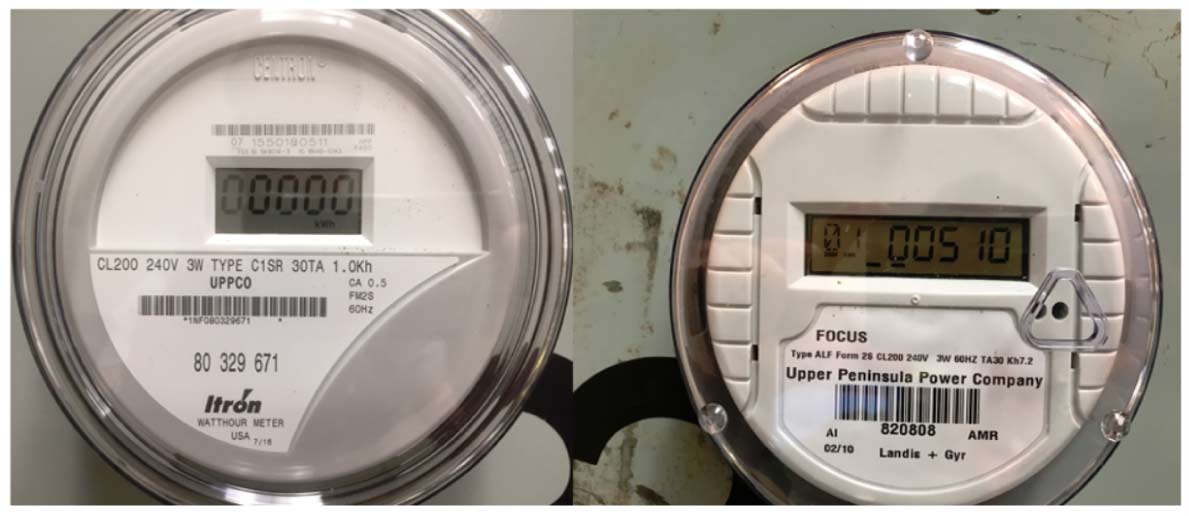
UPPCO digital meters will scroll through a number of different screens while operating. Your energy consumption will appear as 5 or 6 digits on the screen. Ignore any screens that contain all 0s and all 8s.
UPPCO will estimate your energy usage if unable to receive communication from your smart meter and/or is unable to access your smart meter or non-standard meter. If you have questions about this, contact Customer Service at (906) 449-2013.
Advanced Metering & the Smart Energy Initiative
UPPCO’s Smart Energy program launched in 2018. We’re working to improve reliability and deliver enhanced customer service. To learn more about the Smart Energy Initiative, smart meters, and what it means for you, visit the Smart Meters/Smart Energy page.
The reading in the example below is 94838:
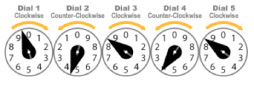
Reading your electric meter is straightforward. For mechanical meters, the dials, which look like little clocks, alternately run clockwise and counterclockwise. Reading from left to right, write down the last number the needle has passed. If the needle is between 2 numbers, UPPCO will use the lower of the 2 numbers. When the needle is between a 9 and 0, the 9 is used. As an example, the correct reading concerning the dials above is 94838.* The difference between the new reading and the previous reading is your monthly energy use.
*Dial 4 is still read as a 3 despite the needle being on 4 because the dial to its right has not passed 0.